
Images that Sound
Images that SoundというAIモデルを試してみた。text 2 sound & image。オーディオスペクトラムの画像が、絵として音として自然に成立する。
Method
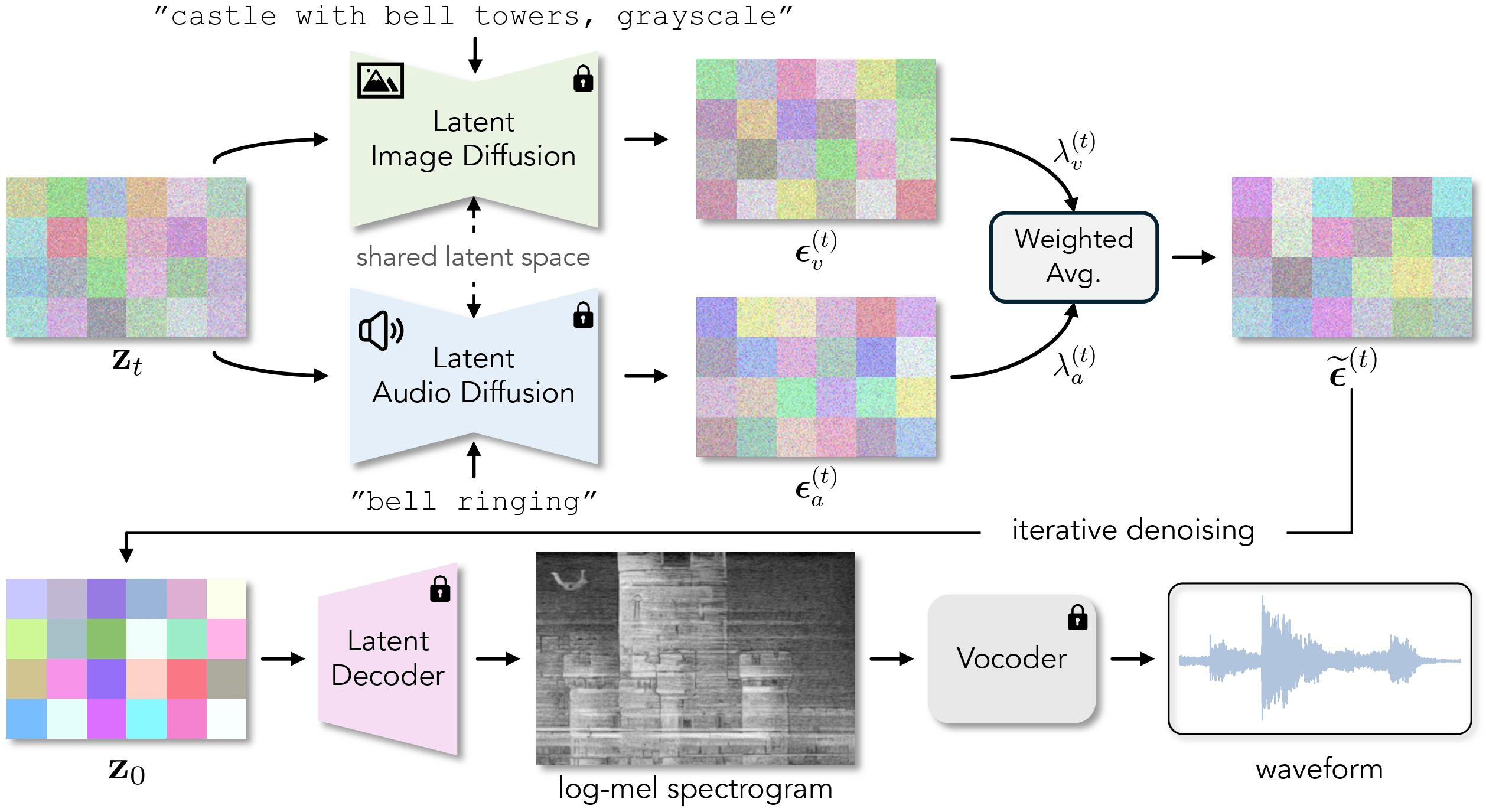
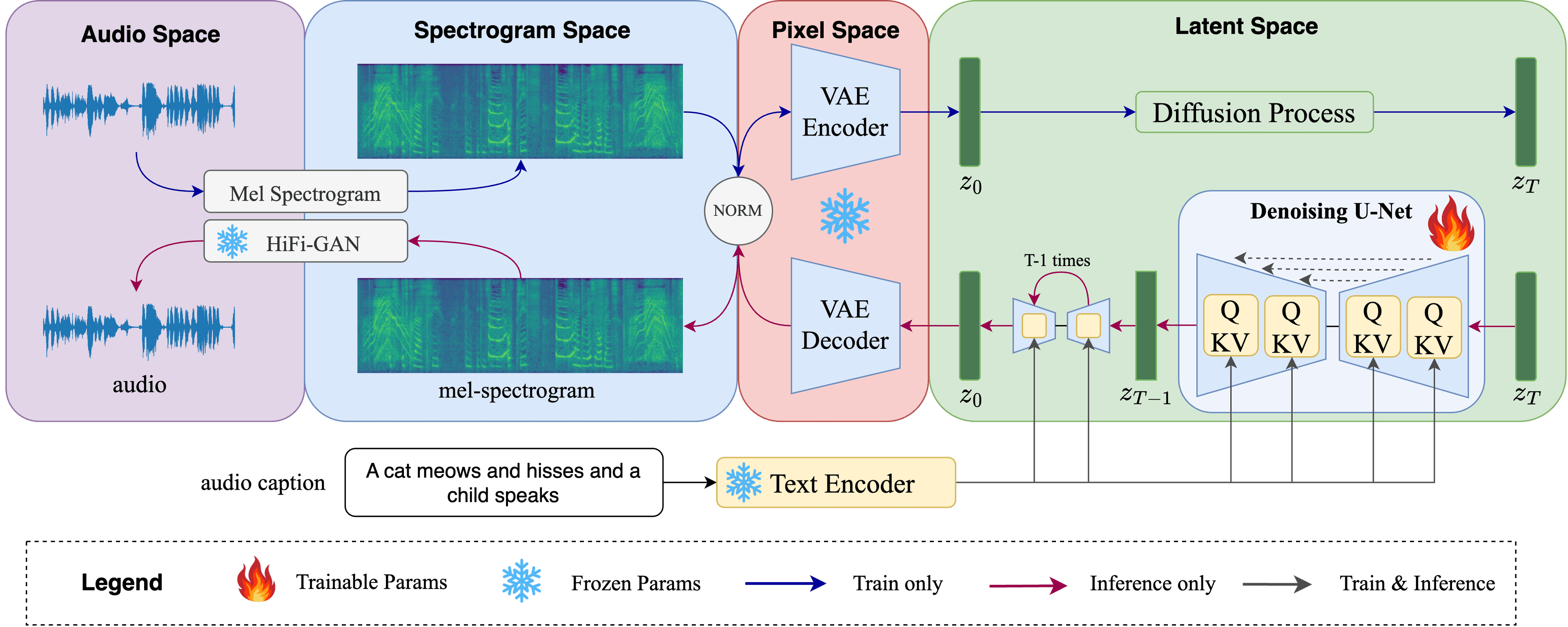
画像の拡散モデルにStable Diffusion、音の拡散モデルにAuffusion (project pageはこちら)。両方の潜在空間を共有し、並行して訓練していくことで、画像と音を両立させている。
カラー化にはFactorized Diffusionを使用(論文は同一著者)。コードは未公開。
Factorized Diffusionのギャラリーでは、モノクロームとカラーで見え方が違う錯視の画像生成が掲載されている。
Colabデモ
readmeはanaconda環境なので、いくつか変更した。hugging faceのapiと、DeepFloydのアクセス許可が必要。
https://drive.google.com/file/d/1U2S6kf_ETJ9rN3Dx6c9TKtt-Lp9XmvYA/view?usp=sharing
Output Samples
失敗例
実際のところ、うまくいかないものは多い。
AuFussion
AuFussion Colab Demo
サンプル
“Birds singing sweetly in a blooming garden”
“formula 1 engine sound”
“mongolian throat singing”
Ref.
Spectogram art: A short history of musicians hiding visuals inside their tracks
https://www.youtube.com/live/nQLPxE8tMtc?si=tR21Tk9Fi6QJ8MEE&t=240
おまけ:プロンプトのテキストを含めずに動画を書き出す
デフォルトの動画書き出しには、プロンプトのテキストが焼き込まれる。動画のみを書き出す場合は、下記を src/utils/animation_with_text.py に追記し、src/main_denoise.py などの中で import して使用する。
def create_single_image_animation_without_text(image_path, audio_path, output_path):
    # Load images
    image = np.array(Image.open(image_path).convert('RGB'))
    image_height, image_width, _ = image.shape

    max_image_width = image_width

    # Create a white slider image without shadow
    slider_width = 2  # Increased width
    slider_height = image_height  # Adjusted height
    slider_color = (240, 240, 240)  # White

    # Create slider without shadow
    slider = np.zeros((slider_height, slider_width, 3), dtype=np.uint8)
    slider[:, :] = slider_color  # Main slider area

    # Load audio using soundfile
    audio_data, sample_rate = sf.read(audio_path)

    # Calculate video duration based on audio length
    video_duration = len(audio_data) / sample_rate

    # Define video dimensions
    video_width = max_image_width

    # Function to generate frame at time t
    def make_frame(t):
        # Calculate slider position
        slider_position = int(t * (max_image_width - slider_width // 2) / video_duration)

        # Create a white blank frame
        frame = np.ones((image_height, video_width, 3), dtype=np.uint8) * 255

        # Add image to the frame
        image_start_pos = (0, 0)
        frame[image_start_pos[0]: (image_start_pos[0] + image_height), image_start_pos[1]:(image_start_pos[1] + image_width)] = image

        # Add slider to the frame
        frame[image_start_pos[0]:(slider_height+image_start_pos[0]), (slider_position):(slider_position+slider_width)] = slider

        return frame

    # Create a VideoClip
    video_clip = VideoClip(make_frame, duration=video_duration)

    # Write the final video
    temp_path = output_path[:-4] + '-temp.mp4'
    video_clip.write_videofile(temp_path, codec='libx264', fps=60, logger=None)

    # the reason we do this is because when change audio codec, the quality of audio is changed a lot.
    # So we copy the original audio to ensure we have best audio quality
    os.system(f"ffmpeg -v quiet -y -i \"{temp_path}\" -i {audio_path} -c:v copy -c:a aac {output_path}")

    os.system(f"rm {temp_path}")